LPCAMM2 Brings Upgradeable RAM Back to Thin Laptops
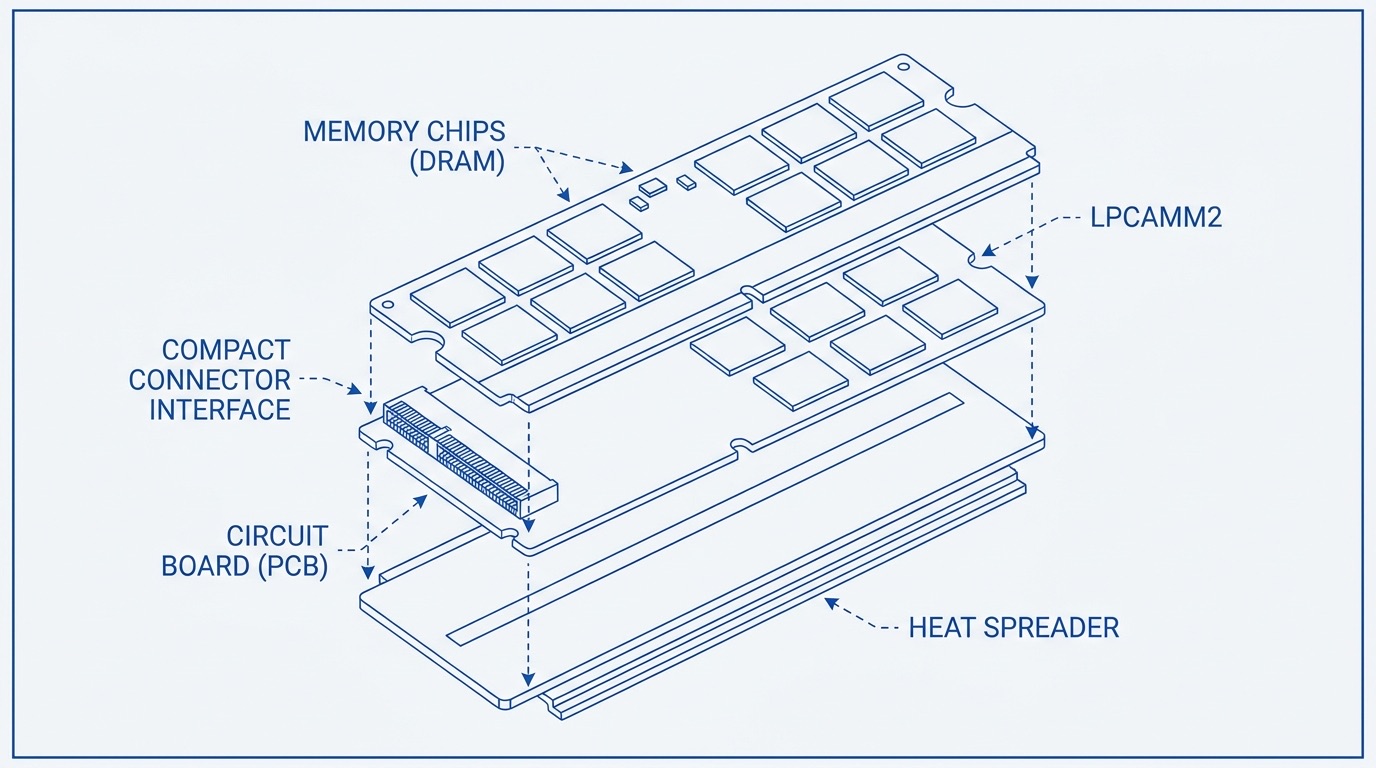
LPCAMM2 (Low Power Compression Attached Memory Module 2) is a new memory standard that does what was long thought impossible: it delivers the power efficiency of soldered LPDDR5x while giving users a physically removable, upgradeable module. For years, the choice was binary — thin laptops got soldered RAM that could never be changed, while upgradeable laptops used SO-DIMMs that consumed more power and required thicker chassis. LPCAMM2 breaks that tradeoff in half.
What Is LPCAMM2?
LPCAMM2 is a JEDEC-standardized memory module format (JESD318) finalized in late 2023. Unlike a traditional SO-DIMM, which uses a parallel bus and requires a relatively tall connector, LPCAMM2 uses a compression-mount connector — a spring-loaded mechanism that clamps the module against a board-side socket without solder. The module sits almost flush with the motherboard and measures roughly 78 mm x 26 mm, smaller than a SO-DIMM in two of three dimensions.
The memory chips on an LPCAMM2 module are still LPDDR5x — the same low-voltage DRAM used in soldered configurations. This means the memory controller sees the same electrical interface it would in a soldered design. The compression attached connector is the key innovation: it handles signal integrity at high speeds without the permanence of solder, while keeping the module thin enough for sub-18 mm laptop chassis.
How the Connector Works
The compression socket uses an array of spring contacts that press against pads on the module underside. The module is held in place by two screws. Removal takes under two minutes and requires only a Phillips screwdriver — no heat gun, no prying, no risk of tearing pads. The contact array is rated for hundreds of insertion cycles, meaning repeat upgrades are fully supported by the hardware design.
LPCAMM2 vs. Soldered LPDDR5x vs. SO-DIMM
Understanding LPCAMM2 requires placing it against both alternatives it replaces:
- Soldered LPDDR5x: Used in nearly every thin laptop made between 2020 and 2024. Maximum speeds reach 8533 MT/s. Power consumption at idle is extremely low. The fatal flaw: the memory is permanent. If you buy 16 GB and later need 32 GB, you buy a new laptop.
- DDR5 SO-DIMM: The standard upgradeable module used in larger laptops and desktops. Speeds top out around 5600 to 6400 MT/s in laptop implementations. Voltage is 1.1 V versus 0.5 V for LPDDR5x — a significant power delta that translates to real battery life impact. SO-DIMMs also require a taller clearance that forces thicker chassis designs.
- LPCAMM2: Runs LPDDR5x at up to 9600 MT/s on current implementations. Voltage matches soldered LPDDR5x at approximately 0.5 V. The module is removable and user-replaceable. The chassis height penalty over soldered RAM is roughly 1 to 1.5 mm — negligible in practice.
In benchmarks published by hardware reviewers, LPCAMM2 at 7500 MT/s matched or slightly exceeded DDR5 SO-DIMM at 5600 MT/s in memory bandwidth tests. The lower voltage means battery life in thin laptops stays competitive with fully soldered designs.
Which Laptops Support LPCAMM2
As of mid-2024, LPCAMM2 support is limited but growing:
- Dell XPS 15 (9530, 2024 refresh) and XPS 16 (9640): The first mainstream consumer laptops to ship with LPCAMM2. Both use Intel Core Ultra (Meteor Lake) processors. RAM options at purchase are 32 GB and 64 GB. Upgrade modules from Crucial cost approximately $120 for 32 GB and $230 for 64 GB as of Q2 2024.
- Lenovo ThinkPad X1 Carbon (Gen 12): Lenovo added an LPCAMM2 option on select configurations. Enterprise buyers can order with 32 GB or 64 GB and upgrade in the field.
- Framework Laptop 16: Framework confirmed LPCAMM2 support for future mainboard generations, consistent with its repairability-first design philosophy.
- HP EliteBook 800 series (2024 models): HP introduced LPCAMM2 in its business lineup, targeting IT departments that need in-field memory upgrades without depot repair.
Intel Lunar Lake and Arrow Lake platforms include native LPCAMM2 controller support, suggesting the 2025 laptop generation will see broad adoption across mid-range and premium SKUs. AMD has not yet announced LPCAMM2 controller support, though third-party socket implementations are technically possible.
Performance Specifications
Current LPCAMM2 modules operate at the following specifications:
- Speeds: 6400 MT/s, 7500 MT/s, and 9600 MT/s (JEDEC-defined speeds; 9600 MT/s is available in OEM configurations)
- Capacities: 16 GB, 32 GB, and 64 GB per module (single-module designs; dual-module boards are in development)
- Voltage: 0.5 V (LPDDR5x standard), versus 1.1 V for DDR5 SO-DIMM
- Bandwidth: Up to 77 GB/s at 9600 MT/s (dual-channel on a single module through x16 bus)
- Latency: Comparable to soldered LPDDR5x; no measurable regression from the compression connector at current speeds
The single-module dual-channel implementation is an important detail. Where SO-DIMM requires two physical sticks for dual-channel operation, LPCAMM2 achieves dual-channel from a single module by routing two independent 32-bit channels through the compression connector. This simplifies board design and reduces the number of connectors needed.
Repairability and Longevity
The repairability case for LPCAMM2 extends beyond individual upgrades. iFixit gave the Dell XPS 15 (2024) a repairability score of 7/10 — a dramatic improvement over the 3 to 4 out of 10 scores common among thin laptops with fully soldered RAM. The memory module is the largest single driver of that improvement.
From a sustainability standpoint, the calculus is straightforward: a laptop that can be upgraded from 16 GB to 32 GB when workloads demand it stays in service two to three years longer than one that cannot. The environmental cost of manufacturing a new laptop — including rare earth mining, fabrication energy, and shipping — dwarfs the cost of producing a single memory module.
Right-to-repair legislation gaining traction in the EU and several US states specifically targets component replaceability. LPCAMM2-equipped laptops are better positioned for compliance with upcoming repairability mandates than their soldered counterparts.
A laptop that accepts a memory upgrade today is a laptop that does not go to landfill in 2027.
Who Should Care About LPCAMM2
Not every buyer needs to prioritize LPCAMM2, but it matters most for these groups:
- Power users who buy thin laptops: If you run memory-intensive workloads — video editing, large language model inference, virtual machines — and want a thin chassis, LPCAMM2 lets you start at 32 GB and upgrade to 64 GB without replacing the machine.
- Enterprise IT departments: Field-upgradeable memory cuts depot repair costs. A technician can upgrade RAM on-site in under five minutes.
- Environmentally conscious buyers: Longevity directly reduces e-waste. An upgradeable laptop is a longer-lived laptop.
- Buyers who plan ahead: A laptop purchased today with 32 GB of LPCAMM2 RAM can be upgraded in two or three years when 64 GB becomes a practical necessity — at module cost, not full replacement cost.
Buying Recommendations
If LPCAMM2 is a priority, the Dell XPS 15 (9530/9640) is the clearest entry point as of mid-2024. Buy the base 32 GB configuration and save $200 to $400 versus the 64 GB option at purchase — upgrade later with a Crucial module at a fraction of the cost. Verify that the specific SKU you are purchasing includes the LPCAMM2 socket rather than a soldered configuration; Dell sells both within the same model line depending on the processor tier.
For ThinkPad buyers, confirm LPCAMM2 availability in the spec sheet — not all X1 Carbon Gen 12 configurations include it. On Lenovo configurator, the memory type is listed under the Memory dropdown; look for LPCAMM2 explicitly.
Avoid paying the OEM premium for 64 GB at purchase if your current workloads do not require it. The module upgrade path is the financial and practical advantage LPCAMM2 was designed to provide — use it.